The Verge: How to recover when your Facebook account is hacked

Hopefully the day will never come when you find your Facebook account has been hacked or taken over. It is an awful feeling, and I feel for you for the world of hurt that you will experience in time and perhaps money to return your account to your rightful control. Let me take you through the recovery process and provide some proactive security pointers that you should follow to prevent this awful moment from happening, or at least reduce the chances that it will.

There are actually three different scenarios.

Scenario 1. You let a family member or friend “borrow” your Facebook account on your computer or phone. They proceed to consume content, post messages as you, or befriend random people. This happened to a friend of mine, who had a grandchild staying at her home for a week. The girl left town and left a mess behind on my friend’s Facebook account. “She didn’t post anything to my account, but I had odd friend requests that I had to clean up. I decided to just quit using my account.” This is more of a nuisance than a hack, but still annoying.

Remedy: First, check to see where else your account is already logged in at this screen, as shown below:

This list should remind you of all of your devices that you have used Facebook on in the past. I took this screenshot after I found (and then removed) one of older Windows laptops that I hadn’t used in years on the list. You’ll also see an entry for my iPhone that is located somewhere in Indiana. I haven’t visited that state in years, so sometimes the geo-location algorithms are a bit wonky. Even if your account isn’t hacked, it is helpful to routinely check this screen to make sure you haven’t enabled a login by mistake.

If you don’t recognize (or don’t use) any of these devices, click on the three vertical dots on the right and force those machines to log out of your account. Next, change your password to something unique. Also, remember in the future to sign out of Facebook (and Messenger) before you loan your device to anyone.

Scenario 2. Someone uses your photo and name and sets up a new account. Then they proceed to try to recruit your FB friends to their account.

Remedy: There isn’t much you can do about it, other than tell people you are still you and to ignore the imposter. This should be a warning when you receive a friend request from someone that you think you have already befriended, or someone that you haven’t communicated with in years. A word to the wise: send them an email or text asking if the request is genuine.

Finally, there is the doomsday scenario. Someone guesses your account password and proceeds to lock you out of your account. This situation is the most dire and fixing this will depend on what else you have linked to your Facebook account and how determined you are to get it back.

This happened to Elizabeth, a book author. She ended up working with two different friends who were IT professionals and a lawyer over the course of four months. She had two complicating factors that made recovering her account difficult. First, she used Facebook ads to promote her books so she had connected her login to her credit cards. This resulted in the hacker charging her card with their own ads to try to lure other victims to compromise themselves. The second complication was that she was using her author’s pen name and a random birthday for her account. During the recovery process, Facebook asks you scan your ID to verify who you are. When she told me this, I was concerned. For years I prided myself on using January 1 as my Facebook “birthday.” Now she was telling me that I was setting myself up for trouble if someone hacked my account.

She eventually got her password reset, but almost immediately the hacker would then reset and takeover her account again. “I tried to get someone at Facebook to help me, but I couldn’t get anyone on the phone,” she told me. Before the pandemic, the company had a special phone hotline for industry insiders, “but this was discontinued,” she said. She had more success blocking the credit card charges by phoning her bank. “I was trying to be a step ahead of the hacker, and losing sleep. My whole life was put on hold as I tried to deal with the situation. I got no work done for months. I ended up changing my passwords on more than 30 different accounts.”

So if you find yourself in this last situation, you have three basic choices:

  1. Now would be a good time to leave Facebook. The trouble is, you have someone who is pretending to be you, and could leverage your identity into criminal and uncomfortable situations. Not to mention that they could try to leverage bank accounts that are linked to your account or open up credit cards in your name. (More on that in a moment.)
  2. Try to reinstate your account on your own, using Facebook’s own obscure and oftentimes contradictory steps. That is the way most people that I know have tried. However, you will find out very quickly that there is no easy way to do this. You have to communicate with Facebook support through someone else’s account, which seems somewhat contradictory, so hopefully your spouse or friend is willing to lend a hand. (Don’t be tempted to set up a second account, because that could result in both of your accounts eventually being cancelled.) Then you choose one of several options (finding an unauthorized post, an account that uses your own name and/or photos) and enter the rabbit hole to recover your account. If you use Facebook as a means to log into other internet services, you will have to disconnect these links — otherwise a hacker can then compromise these other accounts. If like Elizabeth you have connected your credit card or other financial accounts, you will have to contact these institutions and get these charges rescinded. Start by trying to use Facebook from other devices that you have previously used: perhaps the hacker hasn’t automatically logged you out (as I mentioned earlier under the first scenario).
  3. Use a third-party recovery service, such as com. This will cost you $249 – they will be persistent and if they can’t help you, will refund your fee. You also get a year’s digital protection plan included that normally sells separately for $99. If you have a complex situation like Elizabeth (connected finances, non-matching birthday), I recommend using this path. But make sure you aren’t just employing some random hacker who might just be taking your money and doing nothing else. I spoke to founder Jonas Borchgrevink who confirmed that he is legit (despite Facebook banning any mention of his company) and has helped thousands of people reclaim their accounts. He outlined the various sequence of steps that his staffers try in a Washington Post article. If you are using a different name from what is shown on your ID, he says it is almost impossible to recover your account.

Proactive security measures

So if you haven’t been hacked (yet) and are getting somewhat uncomfortable reading this, here are some steps to take to secure your Facebook account to reduce your pain points. Start today with doing at least one of them, and make sure you take care of all of the items as soon as possible.

First, before you do anything else, you need to set up additional login security on your Facebook account. Facebook offers you a set of confusing choices, but the one that I recommend is to use an authenticator app such as Google Authenticator. (That link will take you to the page below where you set this up.)

This is an Android or iOS smartphone app that will be used as part of the login process, why it is called a second factor. After you supply your username and password, Facebook asks you to type in a series of six numbers that are generated by the app. These numbers change every minute, so you need your phone nearby when you login. If you want extra credit, take the time to enable this second factor method on your other accounts, including any banks and credit card companies that support this method (warning: sadly, few do).

Elizabeth was using a less secure method for her second factor: sending the six numbers as a text message to her phone. You can read more about why this isn’t my preference here,

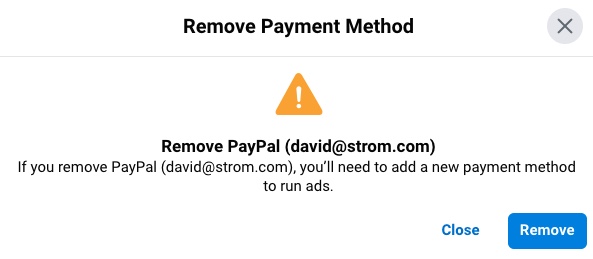
Next, you should check to see if you have any payment methods configured on Facebook, even if you have never purchased any ads. I was surprised that I found my Paypal address linked to my Facebook account in preparing for this article, and I thought that I was being careful about my Facebook security. Go to this link to remove any payment method, If you are running any ad campaigns on your business, you will have to stop them first. (Sample screen shown below)

Next, you should remove connected apps and websites. If you have signed on using your Facebook credentials to third-party apps, now is the time to review and remove them here. The same is true with removing any business integrations. You take a small hit in not being able to automatically login to these other services, but you also protect yourself if your account has been compromised.

If you have a Facebook business page, you should have at least two people who have admin rights to this page. (Go to Page Settings/Page Roles.) If your business account is hacked and you are the sole admin, it will be next to impossible to get it recovered. This contact should also have second factor authentication turned on.

Finally, check your account’s email contacts. You should have at least a second (or more) contact that Facebook can send you notifications, in case your main contact becomes compromised. Of course, use different passwords with these different email accounts.

I know, this seems like a lot of work, and there are a lot of places in the Facebook settings pages that you will have to visit and pay attention to the various choices. And chances are, these links provided above might not work in the future as Facebook likes to make changes to its settings. If these activities to make yourself more secure hasn’t gotten you frustrated, you might want to continue to improve your security. Either the Jumbo smartphone app or Avast One (available on Windows, Mac, iOS and Android) can help walk you through the numerous steps to secure your Google, Twitter and other accounts.

Here are two other parting words of wisdom:

Think before you click. If you get a message from what looks like a social media company saying that your account has been compromised, don’t follow any links or call any phone numbers in the message. This could be a lure from a hacker. Instead, navigate to the site or use their own app directly.

You should also be aware of things that seem unusual. Keep an eye out for messages you didn’t send, posts you didn’t create or purchases you didn’t make. These all could be tells that someone has guessed your password or compromised your account. If you are lucky, it could be an errant teen using one of your computers.

As Elizabeth told me, “being hacked is like getting a digital tattoo, everyone can see the after-effects of your poor choices.”

And if you would rather listen to my descriptions, my podcasting partner Paul Gillin interviewed me on this subject in a recent 16-minute episode.

2 thoughts on “The Verge: How to recover when your Facebook account is hacked

  1. Another reader writes:

    I’m delighted to share my profoundly positive experience with Web Genie Recovery, the esteemed experts who successfully facilitated the recovery of my lost 4 BTC. Having fallen prey to a cunningly devised scam, I had resigned myself to the loss of my investment. The scammers’ adept manipulation had left me feeling utterly devastated, as if all was lost. However, Web Genie Recovery’s intervention proved to be a turning point. Their tireless efforts to track down the perpetrators and retrieve my stolen funds were truly remarkable. With unparalleled expertise in cryptocurrency forensics and blockchain analysis, they demonstrated an unwavering commitment to client satisfaction. Throughout the process, they maintained transparent communication, keeping me apprised of every development. I wholeheartedly endorse Web Genie Recovery and highly recommend their services to anyone in need of expert assistance in recovering lost cryptocurrency assets
    Website: https://webgenierecovery. com.
    Email address: webgenierecoverys @ proton. me OR
    webgenierecovery @ outlook. com
    WhatsApp +1 (206) 771-0586
    Telegram: @ webgenierecovery.

Leave a Reply

Your email address will not be published. Required fields are marked *

This site uses Akismet to reduce spam. Learn how your comment data is processed.